
https://apps.sfc.hk/edistributionWeb/api/circular/openAppendix?lang=EN&refNo=26EC35&appendix=0
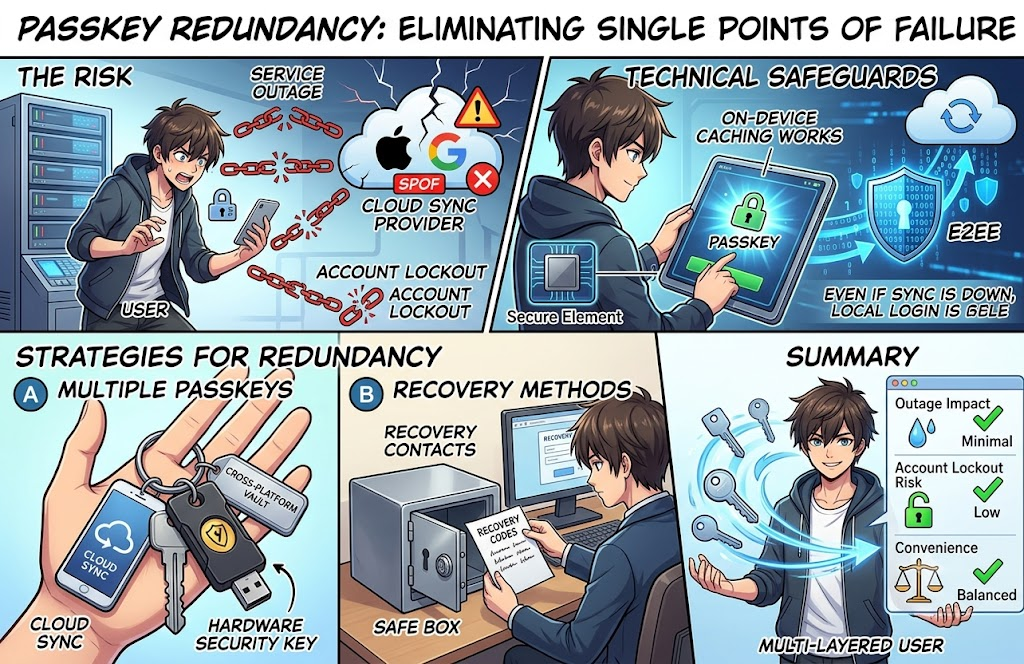
The potential for a Single Point of Failure (SPOF)—such as a Passkey syncing provider going offline or losing access to your account—is one of the most critical security and accessibility considerations when adopting Passkeys.
Here is an analysis of how this risk manifests, how the industry mitigates it, and the best practices to safeguard your access.
1. The Risk: How Passkey Cloud Sync Creates a SPOF
When you use synchronized Passkeys (e.g., Apple iCloud Keychain, Google Password Manager, 1Password, Bitwarden):
- Service Outage: If the cloud provider experiences an infrastructure outage, you may not be able to sync new keys or retrieve existing keys on a new device.
- Account Lockout / Account Loss: If you get locked out of your primary account (e.g., your Apple ID or Google Account), you simultaneously lose access to all Passkeys stored within that ecosystem.
- Platform Dependency: Relying entirely on a native ecosystem (like Apple or Google) can make migrating across operating systems (e.g., iOS to Android) or recovering from a system-wide lock more challenging.
2. Technical Safeguards: Built-in Redundancies
Passkey architecture incorporates design features specifically to prevent single-point failures:
- Local On-Device Caching:Passkeys are stored locally on your device’s secure element (e.g., Apple Secure Enclave, Android Titan M2) and synchronized to the cloud in the background. If the cloud service goes offline temporarily, you can still log in using local Passkeys on your registered devices.
- End-to-End Encryption (E2EE):Cloud providers store Passkeys using zero-knowledge encryption tied to your device PIN/passcode and master credentials. Even if the service provider’s servers are compromised or go down, your private keys cannot be read or tampered with by the provider.
3. Strategies to Eliminate the Single Point of Failure
To protect yourself against outages or loss of a service provider, implement the following redundancies:
A. Register Multiple Passkeys
Do not rely on a single device or single credential. Most major services allow you to register multiple Passkeys for a single user account:
- Cloud Sync Provider (e.g., iCloud Keychain or Google Password Manager) for daily convenience.
- Hardware Security Key (e.g., YubiKey or Google Titan Key) stored as an offline backup in a secure location.
- Cross-Platform Vault (e.g., 1Password, Bitwarden) to decouple your credentials from a single operating system vendor.
B. Keep Secondary Recovery Methods Active
Where supported by the service, configure independent fallback or account recovery channels:
- Account Recovery Codes: Print or safely store offline single-use backup codes provided during account setup.
- Recovery Contacts / Custodians: Set up trusted account recovery contacts (supported by ecosystems like Apple ID).
- Alternative MFA Methods: Keep a secondary TOTP (Authenticator App) or security key registered where permitted.
Summary Comparison
| Aspect | Single Cloud Provider (Default Setup) | Multi-Layered Passkey Setup (Recommended) |
| Outage Impact | Moderate (Local devices work; new setups blocked) | Minimal (Fallback to secondary device or hardware key) |
| Account Lockout Risk | High (Losing master account locks all Passkeys) | Low (Backup keys or recovery codes allow access) |
| Convenience | Highest (Automatic background sync) | Balanced (Requires one-time initial setup for backup keys) |